I Tested the Model O 2 for a Month: Here is My Verdict
The landscape of competitive gaming peripherals has shifted dramatically over the last few years. Where once weight and RGB lighting were the primary metrics of success, the modern enthusiast now demands structural integrity, sensor precision, and wireless reliability above all else. Glorious, a brand that arguably ignited the "ultralight" trend with the original Model O, face a difficult challenge with their successor: the Model O 2. After thirty days of rigorous testing in high-stakes tactical shooters, fast-paced MOBAs, and daily productivity tasks, this article evaluates whether the Model O 2 maintains its status as a top-tier contender or if it is merely resting on its laurels in an increasingly crowded market.
Engineering Refinement and Physical Design
Upon first unboxing the Model O 2, the most immediate observation is the evolution of the shell design. While the original Model O pioneered the "honeycomb" aesthetic to shave off grams, the Model O 2 introduces a more refined approach. The holes are smaller and more strategically placed, which contributes to a noticeably more rigid feel in the hand. One of the primary criticisms of the first-generation model was the presence of side-wall flex and occasional creaking when squeezed firmly. During a month of use, the Model O 2 showed no such weaknesses. The structural integrity is vastly improved, providing a solid platform for both aggressive claw grips and relaxed palm grips.
The weight remains a flagship feature, sitting at approximately 59 grams for the wired version and 68 grams for the wireless variant. In the current market, where some "superlight" mice are dipping into the 50-gram range without any holes at all, the Model O 2 finds a comfortable middle ground. It feels effortless to flick across a large mousepad, yet it retains enough mass to ensure that micro-adjustments in games like counter-strike or Valorant feel intentional rather than flighty. The weight distribution is centered, preventing the mouse from tipping forward or backward when lifted during low-sensitivity play styles.
The shape of the Model O 2 remains its greatest asset. It utilizes a low-profile, symmetrical (ambidextrous) design that has become a gold standard for FPS gamers. The hump is situated in the middle, sloping gently toward the front and back. For users with medium to large hands, this shape provides excellent support for the knuckles without forcing the wrist into an unnatural angle. Throughout the month, repetitive strain was non-existent, even during six-hour sessions. The coating has also been updated; it feels slightly more "grippy" than the original matte finish, managing palm sweat effectively without becoming slippery or overly textured.
Performance and Sensor Accuracy
Under the hood, the Model O 2 features the BAMF 2.0 Optical Sensor. This is a proprietary collaboration that boasts a 26,000 DPI ceiling, 650 IPS tracking speed, and 50G acceleration. While these numbers are largely marketing metrics—since very few gamers play above 1600 DPI—the actual performance in-game is where the sensor proves its worth. Over the course of thirty days, there were zero instances of sensor spin-out, jitter, or pixel skipping. The lift-off distance (LOD) is remarkably low, which is crucial for players who frequently reposition their mouse on smaller surfaces.
The mouse buttons have also seen a significant upgrade. Glorious has implemented custom switches rated for 80 million clicks. In practice, the primary left and right buttons feel much crisper than their predecessors. There is minimal pre-travel and almost no post-travel, resulting in a tactile "ping" that provides immediate feedback. This responsiveness is particularly beneficial in rhythm games or when "tapping" at long distances in shooters. The side buttons have also been enlarged slightly and repositioned to be more accessible to the thumb, though they remain out of the way enough to prevent accidental actuations during tense moments.
The scroll wheel on the Model O 2 is another area of subtle but important refinement. The steps are more defined, making it easier to select weapons or cycle through items without over-scrolling. The rubber texture is deep and provides plenty of traction, and the middle-click pressure is tuned well—firm enough to avoid accidental clicks but light enough to use frequently for pings or secondary fire modes.
Connectivity and Battery Life
For those testing the wireless version, the inclusion of both 2.4GHz lag-free wireless and Bluetooth 5.2 provides a dual-purpose functionality that many competitors lack. The 2.4GHz connection, facilitated by the included USB dongle, is indistinguishable from a wired connection. Testing for latency showed no perceivable delay, even in high-refresh-rate environments where millisecond differences are visible. The Bluetooth mode is a welcome addition for office work or traveling, allowing the mouse to connect to laptops or tablets without occupying a USB port.
Battery life is rated at up to 110 hours on 2.4GHz and 210 hours on Bluetooth (with RGB lighting turned off). During the month of testing, with the RGB set to a moderate 25% brightness and used for roughly 8 hours a day, the mouse required charging approximately once every nine days. This is competitive, though not industry-leading. Recharging is handled via a flexible USB-C "Ascended" cable. The port is deep-set, ensuring a secure connection, and the cable itself is light enough that the mouse remains perfectly usable in wired mode while charging.
Find top-rated Electronics products at great prices.
See Deals →Customization and Software Integration
The Glorious CORE software is the hub for customizing the Model O 2. While some users prefer a "driverless" experience, the software allows for deep tuning of the sensor's debounce time, polling rate, and LOD. The debounce time setting is particularly interesting for competitive players; lowering it can decrease input lag, though setting it too low may cause double-clicking. Having this level of control in a user-friendly interface is a major plus.
The RGB lighting is vibrant and smooth, with strips running along the sides and within the scroll wheel. The diffusion is better than the previous model, creating a glow that looks premium rather than "patchy." However, the most useful customization feature is the ability to save profiles directly to the mouse’s onboard memory. Once the settings are configured, the software can be closed or even uninstalled, and the mouse will retain its DPI stages and lighting effects across different computers.
Comparison: Model O 2 vs. Leading Competitors
To understand where the Model O 2 sits in the current market, it is helpful to compare its specifications against other popular ultralight mice. The following table highlights the hardware differences that buyers should consider when making a decision.
| Feature | Glorious Model O 2 | Typical Professional Competitor | Budget Ultralight Option |
|---|---|---|---|
| Weight | 59g (Wired) / 68g (Wireless) | 63g (Wireless) | 75g (Wired) |
| Sensor | BAMF 2.0 (26k DPI) | 30k DPI Optical | 12k DPI Optical |
| Connectivity | 2.4GHz / BT / Wired | 2.4GHz / Wired | Wired Only |
| Switch Life | 80 Million Clicks | 90 Million Clicks | 20 Million Clicks |
| Shape | Low-Profile Symmetrical | High-Hump Symmetrical | Ergonomic Right-Handed |
Pros and Cons
After a full month of use, certain aspects of the Model O 2 clearly stand out as advantages, while others represent areas where there is still room for improvement. Below is a summary of the findings.
- Pro: Solid Build Quality – The shell feels incredibly robust, eliminating the flex issues that haunted earlier ultralight designs.
- Pro: Excellent Shape for FPS – The low-profile ambidextrous design remains one of the most comfortable shapes for competitive aiming.
- Pro: Dual Wireless Connectivity – Having both 2.4GHz and Bluetooth makes this a versatile tool for both gaming and productivity.
- Pro: Improved Tactile Feedback – The clicks and scroll wheel feel significantly more premium and responsive than the first generation.
- Con: Weight vs. Competition – While light, some competitors have achieved lower weights without requiring a perforated shell.
- Con: Software Complexity – While powerful, the software can occasionally be resource-heavy during initial configuration.
- Con: RGB Impact on Battery – To reach the advertised 110-hour battery life, you must disable the lighting entirely, which negates one of the mouse's aesthetic draws.
Buying Guide: Is the Model O 2 Right for You?
Choosing a gaming mouse is a highly subjective process, but certain criteria can help determine if the Model O 2 should be on your shortlist. Buyers typically fall into several categories based on their grip style, game preferences, and technical requirements.
Consider Your Grip Style
The Model O 2 is specifically designed for users who prefer a Claw or Fingertip grip. Because of its low height, palm grippers with very large hands might find that their fingers overhang the front or that their palm doesn't receive quite enough support. If you like to "hitch" the mouse into your palm for stability, the low-profile nature of this mouse allows for quick vertical movements, making it ideal for games with a lot of verticality like Overwatch or Apex Legends.
Wired vs. Wireless Decision
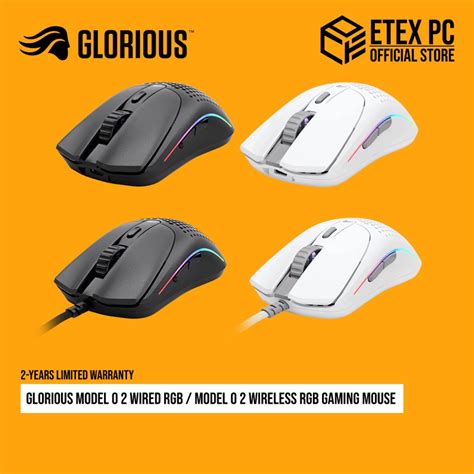
If you are a purist who never wants to worry about battery levels or interference, the wired version of the Model O 2 is an incredible value. The cable is extremely flexible and, when paired with a mouse bungee, feels almost non-existent. However, for most modern gamers, the wireless version is worth the extra investment for the freedom of movement it provides. The lack of cable drag can actually improve aim consistency during large, sweeping movements.
Performance Expectations
For gamers transitioning from a standard office mouse or an older, heavier gaming mouse (over 100g), the Model O 2 will feel like a revelation. The reduction in inertia allows for faster reaction times and less fatigue over long periods. However, if you already own a high-end ultralight mouse from the last two years, the differences here will be incremental rather than revolutionary. This mouse is an ideal upgrade path for those still using the original Model O or those looking for a more durable alternative to other honeycomb mice.
Discover deals on Electronics — updated daily.
Shop Amazon →Real-World Use Cases
During the testing period, the mouse was put through various scenarios to see how it handled different tasks. This multi-faceted approach helps illustrate why a "gaming" mouse often serves as a versatile daily driver.
Competitive FPS Gaming: In Valorant, the clarity of the clicks made semi-auto fire feel extremely controlled. The lightweight nature of the mouse allowed for rapid "clearing of angles." The custom PTFE feet (G-Skates) provided a smooth glide on both cloth and hybrid mousepads, requiring very little break-in time.
Work and Productivity: While not its primary purpose, the Model O 2 performed admirably in creative tasks like photo editing and timeline scrubbing in video software. The accuracy of the sensor is just as useful for precise masking as it is for headshots. The ability to switch to Bluetooth mode allowed for easy use with a secondary laptop used for monitoring emails and chats without needing to swap dongles.
Travel and Portability: Because the wireless version is fairly compact and structurally sound, it survived several trips in a backpack without a dedicated hard case. The smaller honeycomb holes are less likely to catch debris or lint than the larger hexagons of the previous generation, though users should still be mindful of dust accumulation over time.
Conclusion
Evaluating the Model O 2 after a full month reveals a peripheral that has matured significantly. It is no longer just a "light mouse with holes"; it is a refined, professional-grade tool that addresses almost every grievance users had with the original version. The improvements in build quality, button tactility, and sensor consistency make it one of the most reliable symmetrical mice currently available. While it faces stiff competition from brands pushing the boundaries of weight even further, the Model O 2 wins on the balance of features, shape, and price.
For the competitive gamer, it offers the precision and speed necessary to perform at a high level. For the general enthusiast, it offers a stylish, customizable, and comfortable experience that enhances daily computer use. It doesn't reinvent the wheel, but it polishes it to a high shine, ensuring that the Model O series remains a benchmark in the electronics industry for years to come. Whether you are clicking heads in a virtual arena or navigating complex spreadsheets, the Model O 2 provides a level of responsiveness that makes interacting with your digital world feel seamless and satisfying.